
Episode 1: Agentic Coding 101
We kick off this project with a deep dive into agentic coding. What LLMs and agents are, how models and effort work, how to get set up for free with OpenCode, and building your very first web page.
Relevant Guides
Guides that might be useful to you when solving this step in the process.
What is Agentic Coding?
What agentic coding is, why it is changing how software gets made, and where to start if you are learning to code today.
Key Agentic Coding Concepts
Models, tokens, context windows, and the other ideas you need to understand to use AI coding agents well.
Installing an Agentic Coding Platform
Step by step instructions for installing OpenCode, signing in, and choosing an AI model, including options that cost nothing at all.
Using a Code Editor
What a code editor is, why you should not write code in a word processor, and which one we recommend when you are learning to code.
Installing VS Code
Step by step instructions for installing Visual Studio Code on Windows, macOS, and Linux.
HTML Basics
What a web page actually is, how it's put together, and the tags you'll use to structure everything you ever make on the web.
Introduction
Welcome to the first in this new series looking at how to use agents, how to use LLMs to build in this modern age where coding has changed so much. We've run many sessions like this over the years for Exercism, but this is the first official Learn to Build live session for Jiki.
Let me explain what this series is going to be, what we're covering today specifically, what we're going to be covering over the series, and who this is for. I'll start with that last question.
Who this is for
This is really for two groups of people. Those people who are totally new to coding, new to this whole world, just wanting to get started and work out how they can start to learn things. But it's also for people, maybe much more experienced people, possibly even senior developers, who haven't yet really got into the agentic coding changes that are happening and want to learn about what's going on, see some stuff in action, discuss stuff, and just build a real understanding of that. So you could be anywhere on that spectrum, from your first day of coding, maybe you decided to code this morning, found Jiki and here you are, all the way through to someone really senior.
In this particular series (there are going to be a number of series), I'm going to presume that you know nothing. So if you are a senior developer, there's going to be lots of stuff that I say that you just know like the back of your hand, and that might feel a bit boring. If this is your first day, there shouldn't be anything that I'm presuming that you know. There might be things that go over your head, but I'm treating this session as if it's for you. And if you haven't done this new type of coding before and you are more senior, this will still be useful.
I'm going to take you through a little bit of what it means to do this type of coding. I'm going to show you a couple of examples of things I need to sort right now in Jiki, and fix them, just as a bit of a preamble. Then we're going to discuss some of the terms that we use and how these things work together. And then we're going to go and actually just make something. We're going to make a new homepage.
This is something that I want to encourage everyone to do. Build yourself a new website. It might be your homepage. It might be something else. Maybe just make a CV in code, a resume in code, whatever. After this session, put into practice what you've seen here and try things out.
I'm going to be using Claude and some more advanced things, but I'm also going to be showing you how you can do this if you have no money to spend on this. If you want to work with agents for free, that's what we're going to be looking at as well.
What should you have prepared beforehand?
Absolutely nothing. You just rock up. I'm going to explain things to you, and then I'm going to release a series of guides that go along with this. Guides on how to install OpenCode, which we're going to be looking at, guides on the different terms in LLMs and how they work, and a guide on how to use GitHub, which we're going to talk about as well. You'll be able to spend a couple of days just catching up and working through those.
If you have a question that I don't answer in this episode, you can always go into the forum at forum.jiki.io and ask it there. I'm there. Other senior developers and other people who are watching along are there and can answer questions too.
Spotting the mistakes LLMs make
I'm going to jump over into Jiki's forum, to something that I noticed a little bit earlier. These are different topics to do with translation, and you'll notice that most of them have a flag next to the country. A Dutch flag, a German flag. We have a turkey next to Turkish. Probably a little racist. We'll probably have to deal with that one in a minute. But the one that I saw was the Indonesian one. This has all been made by Claude, this choice of emoji. And here it's clearly just made up an emoji, or got an emoji that doesn't work.
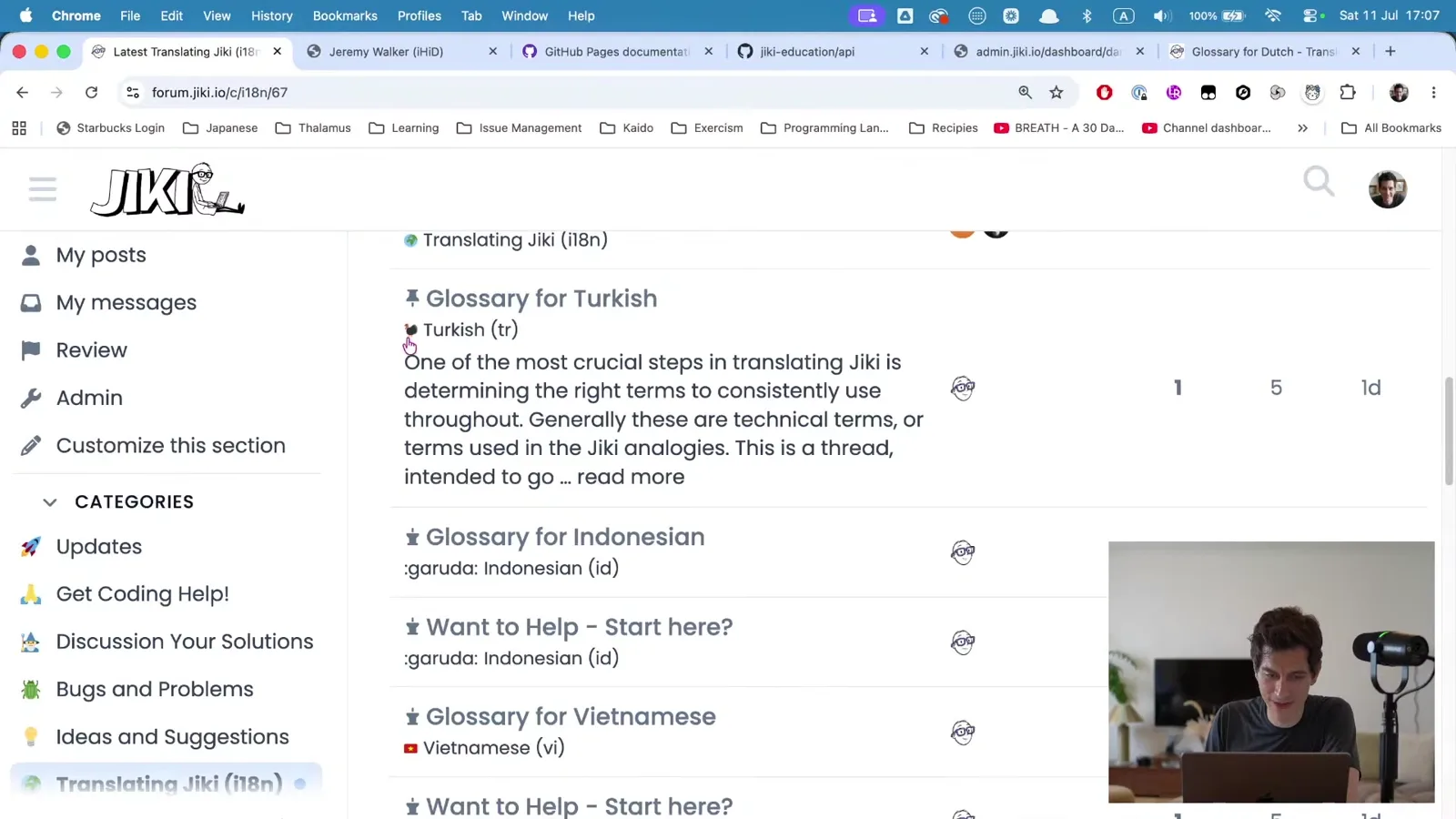
This is where I want to start us off, because this is real. I saw this two minutes before I came on stream. This is the sort of thing that you're going to see a lot as you're working with these LLMs and these agents. They make things up. They think there's an emoji here, but it doesn't work on this website. They're supposed to put a flag for Turkey, but instead they put a literal turkey.
These are the sorts of mistakes that are really obvious to us as humans. We can see them straight away. They jump out. We have a little chuckle to ourselves. The concern is the same decisions that the LLM is making here. And this is the most powerful model. This is Fable. This is the model that's so intelligent and dangerous the US government banned it. Yet it still puts a turkey in for the Turkish flag, and doesn't necessarily know that that might annoy somebody. It could of course just have a great sense of humour. Not sure.
These are the visible things that are obvious. Imagine how many other little mistakes, or should we say bad decisions, these LLMs are making under the hood. As we go on for the next year, or many years, of doing these streams, LLMs will improve. But the thing I want you to know straight away, and I want you to really internalize, is that these are not some sort of coding gods that you can just give things to and they will get everything right. They consistently make mistakes. Some of them are obvious and funny, and some of them aren't. If you want to be a modern software developer, a big part of your job is to look for these mistakes. And by that I don't mean look for when they put a turkey instead of a Turkish flag. I mean look for the conceptual mistakes they're making, the ideas, the things that they are coming up with that just don't quite feel right and don't quite make sense.
What does i18n mean?
It means internationalization. 18 is how many letters go between the i and the n. It's a shortcut.
Agentic coding in a nutshell
Let's look at what it looks like to do a little bit of agentic coding. Let's take that glossary for Indonesia with the broken emoji. I'm going to take a screenshot of it, come over to my terminal, and go into Claude Code. We're going to talk in a little bit about how to set this up and everything. It might feel a bit intimidating and black and green at the moment, but we'll come to all of that.
The thing I want to show you is this. I can drag the image in and I can say "fix the incorrect emoji". And this is going to go away, and it's going to think and do a lot of things. We can look at some of the stuff it's doing. It's running commands. It's trying to work out what's going on. Why is this flag wrong? What does this flag mean? How has this come up? Now it's starting to read some scripts. This is the script for creating the forum language category, the script that it ran when it created that category. It's now looking through the history of everything it's done, and it's trying to work out when this went wrong, how it went wrong, why it went wrong. It's reading various files. It's running various commands. You can see this increasing, running its fourth command, and so on.
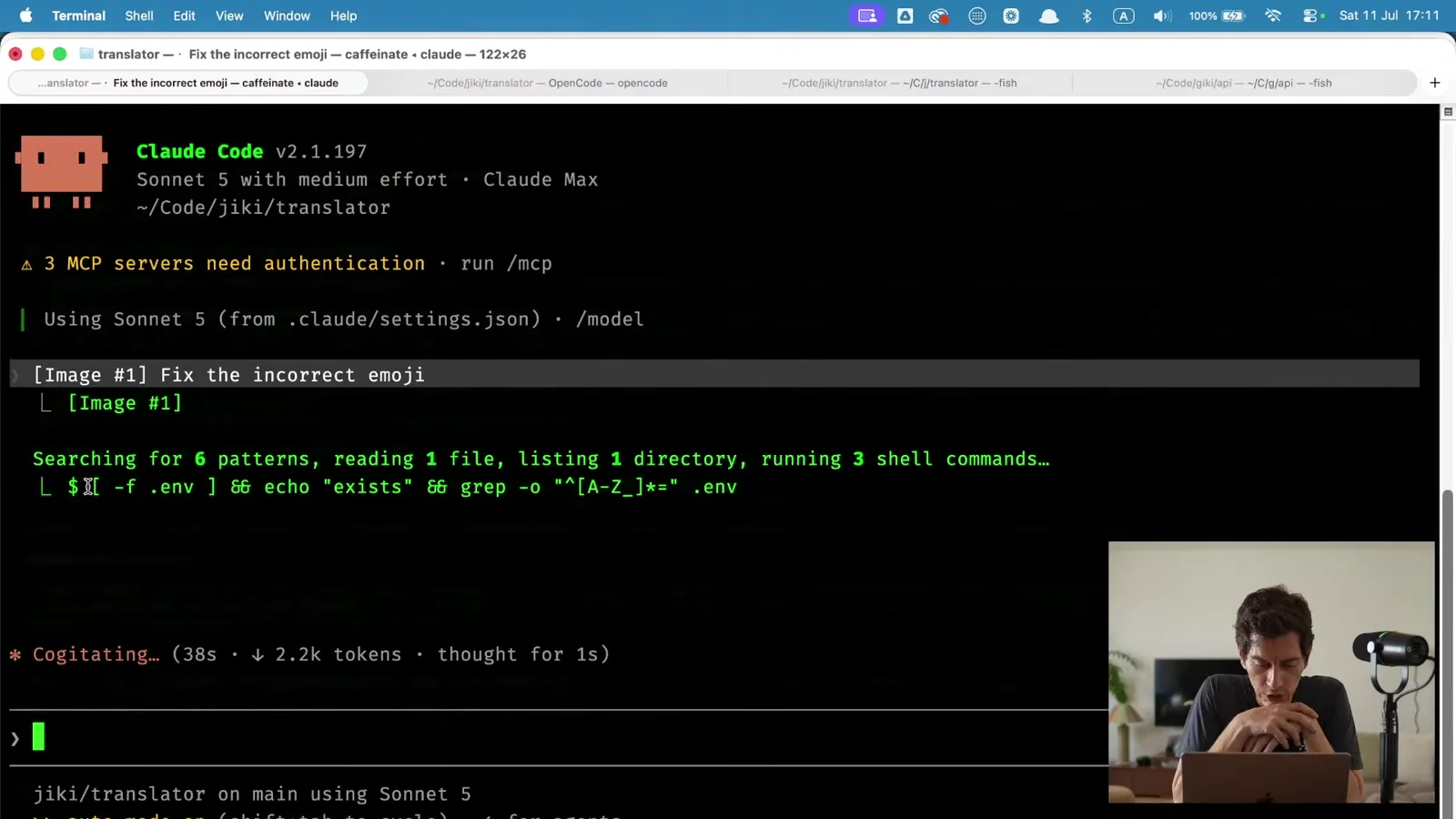
And then it says it's found it. The correct emoji should be Indonesia's flag, not :garuda:. It goes away, it runs something that updates the category. And then if we come over to the forum now and open this up, you can see it's fixed it. We now have an Indonesian flag instead.
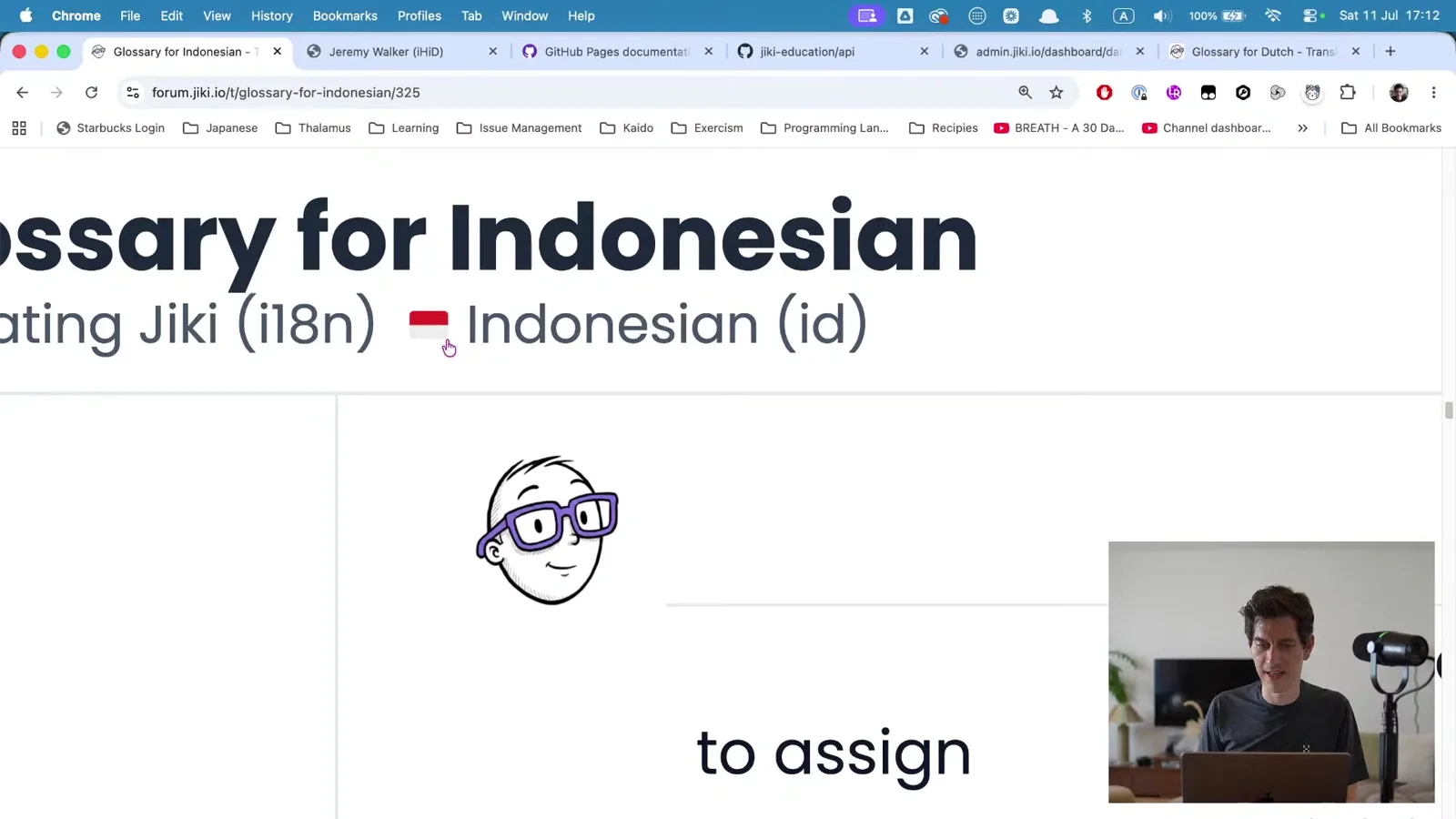
So this is agentic coding in a nutshell. We've said "do this one thing". It's gone away. It's run these different commands. It's read some documents. It's doing all this very complicated stuff in the background, some complicated looking bash that would be very painful to write. Unless you're an Exercism maintainer, in which case it's very easy. But for us mere mortals, it's maybe a bit complicated to write. It looked through, trying to work out when this went wrong. It read the history of the files. It found the Indonesian entry and some logging. It read the rules I've given it, found some variables that enable it to go and update the forum, worked out what's wrong, discussed it with me very briefly, and gone and updated that thing.
This is how I have built Jiki. This is how many modern software developers, I would say probably the majority of software developers working today, are working. We are finding an issue like that. We're spotting it. Maybe it's coming through a ticket from someone else. And then we're handing it over to something like Claude, or one of the many other models out there, and we'll come to all that in a little bit. They run through this complex multi-step process, and then they fix the bug.
Now, this bug is obviously very easy. It's one page. It's got an incorrect emoji. It should have this emoji, and it's got a different emoji. So it can fix it pretty quickly. But where this whole flow works really well is when we're not just trying to fix one small thing. We're building a new feature, or debugging something really complicated. That means reading hundreds of files and then needing to write to some files.
Being wise about cost
Before we take a different example, let me show you one thing. I can type usage here, and usage shows us what's happening under the hood. You can see that that took 52 seconds from start to finish for Claude to do, and that cost 37 cents. Now, I'm on Claude Max, which means I get a very big allowance of the different models. So I'm not charged 37 cents for that. It's just included in my monthly subscription.
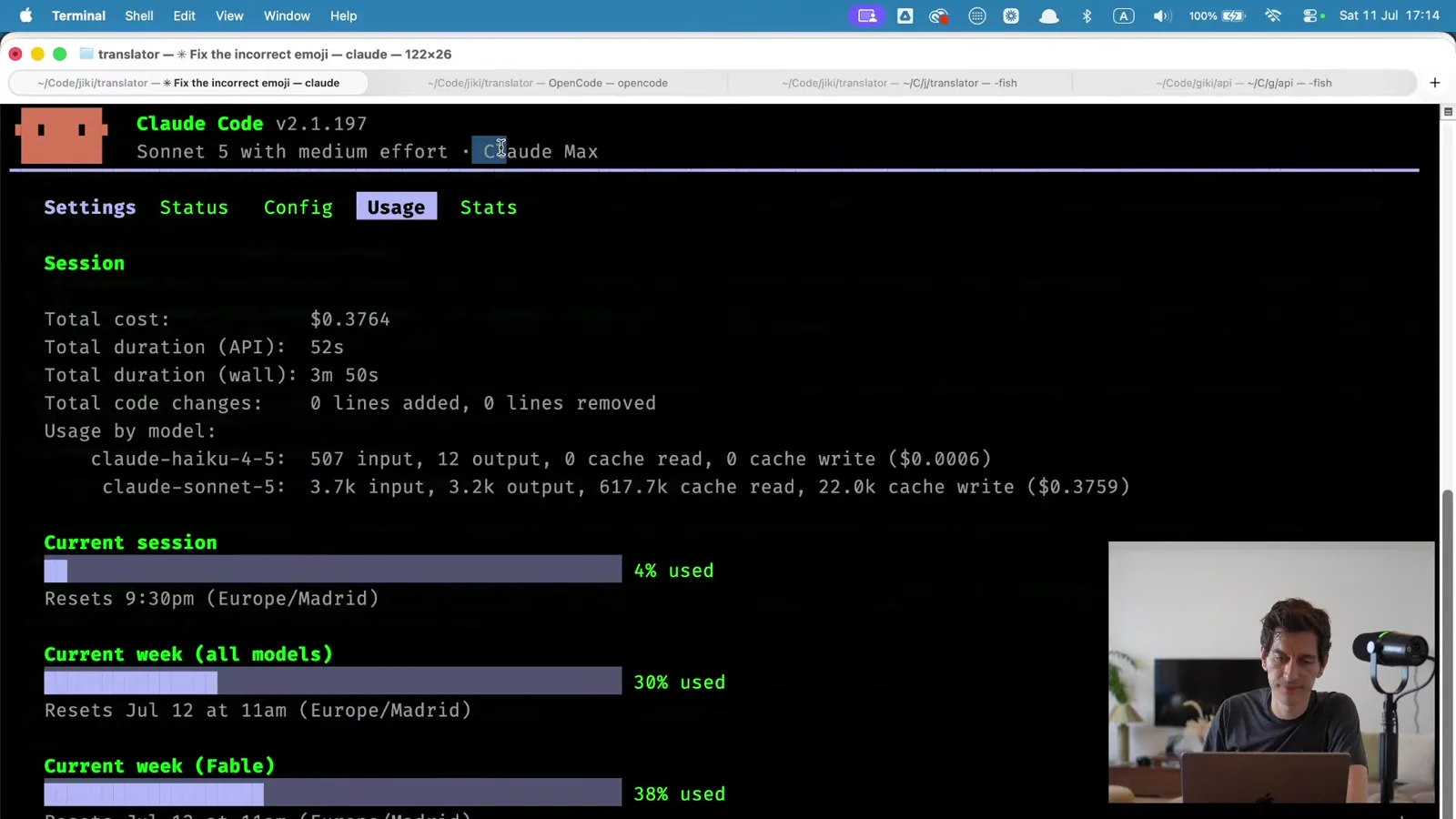
But this is something I want you to be aware of straight away as we start to talk about this. That process of working all that out and solving it cost 37 cents. If I had wanted to, I could have just come over to the forum and edited the topic myself. I could have selected the emoji, typed Indonesia, and clicked on the flag. That wouldn't have cost me 37 cents. If you imagine every single thing that I do as a developer, however many hours a day we're coding for, we probably want to be somewhat wise about what we're using this super powerful intelligence for and what we can just manually do ourselves.
This is especially true for those of you that aren't paying for a Claude Max subscription and don't have a lot of money. I'm going to show you how you can do all of this stuff for free. But when you're on free plans, you're going to have a limited amount of usage. It's quite a large amount of limited usage. It's everything you need. But I want you to get into the mindset of not wasting that usage on things that you can do manually. It's a lot better for you to investigate yourself, work out what's going on, learn a little bit in the process, and then fix that thing. That's the best way for you to learn. If you just start throwing this at everything, we're going to be in trouble.
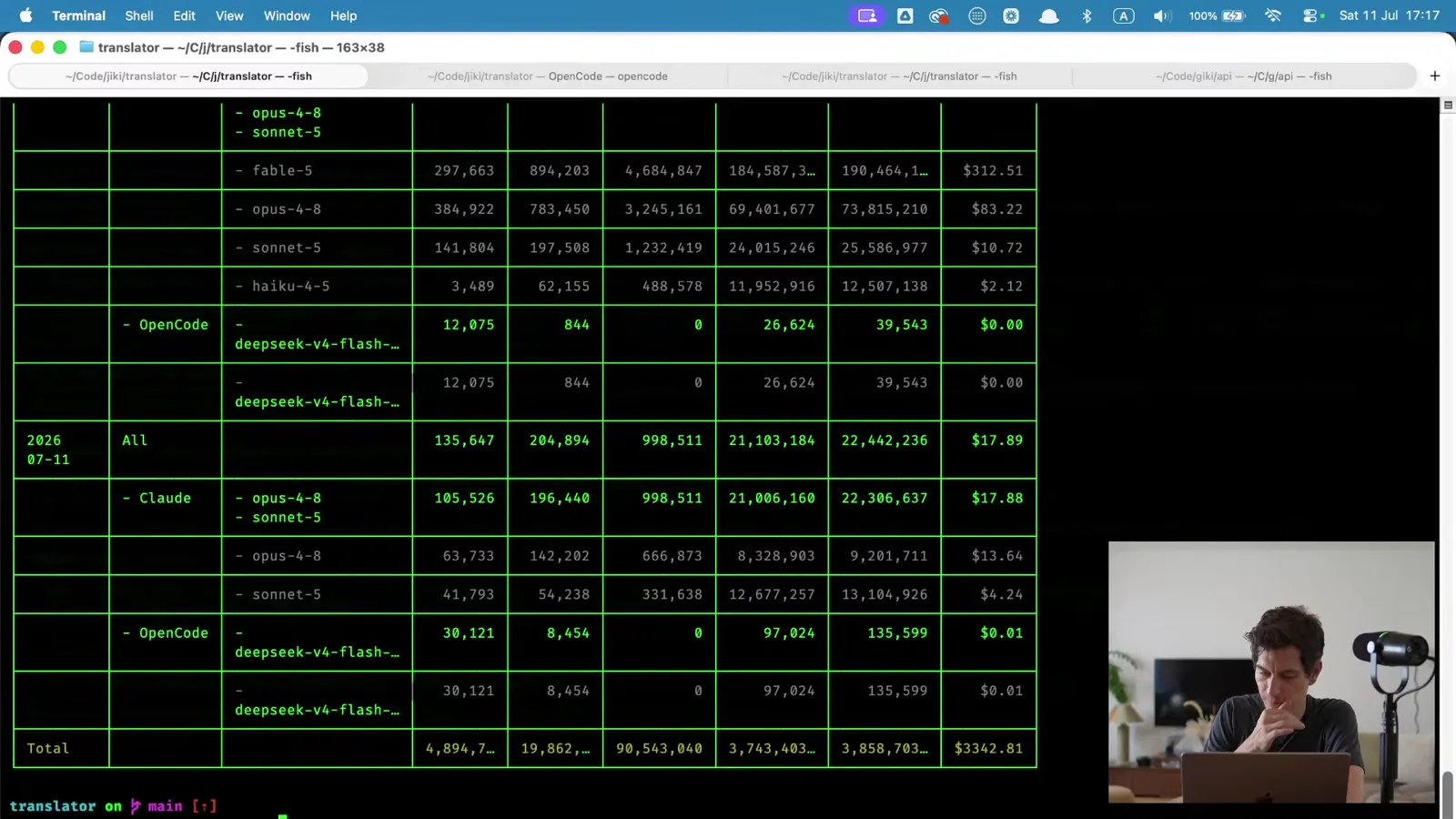
Let me show you one other thing. This shows you what your monthly usage is. This is the last month for me. As I say, I'm on this Claude Max plan, so I'm just paying a flat $200 a month. But if I wasn't on Claude Max, if I was just paying for this directly, it would have cost $35,000 this month. That's three billion tokens I've used this month. We're going to talk about what tokens are in a minute. But you can very quickly rack up some big bills.
What about Ollama and other local models?
Those work. If you've got a powerful enough computer that you can run local models on, a good MacBook or a good Windows machine with a good GPU, you can run models on your computer rather than sending data off to Claude and Claude sending data back. However, it will be much, much slower. That thing that we just looked at that took 52 seconds is going to be taking 5 minutes, or half an hour, instead. Even on a cutting edge machine you're talking 10, 20, 30 times slower than using Claude or something else.
Is it not sometimes cheaper to hire a junior developer rather than pay for an LLM?
Because I have a Claude Max subscription, which is $200 a month, my total cost for using all of this is $200 a month. A junior developer is going to be costing 10 times that. But also, I tend to have maybe six or seven Claudes running at once. So if this Claude is as good as a junior developer, I have six or seven of those junior developers running in different tabs at the same time doing different things. There is just not an economy anymore where getting somebody to write this code manually makes any sense.
But where you can benefit, where you as a junior can become valuable here, is that if you as a junior could be running six or seven Claudes at once, and you could be doing more straightforward, more basic tasks with those Claudes, then you're going to be adding a huge amount of value to a company. My total capacity as a developer is probably running five or six at once, and I'm still spending a lot of time thinking and reading. Everyone is going to top out at that point if they're doing this properly, where they're thinking about what's happening. So if you want to be getting into tech today, where you're going to be adding value is in learning how to control these Claudes, these other models, these LLMs, these agents, and how to prompt them and empower them and review their work in a sensible, powerful way.
Bootstrapping a new language
So that's our starting point. You now know a little bit about how these things work. I'm going to set another one of these off while we talk. One of the things I've built is a bootstrap language command for translating Jiki into different languages. I've already got Brazilian Portuguese bootstrapped on the forum, but I want to bootstrap European Portuguese. I'm just going to click run on that, and then we're going to have a little look at it.
What this does is go away and create information, a guide, a glossary, and other things for us to translate the website into Portuguese. You can see the Turkish one on the forum. That's the glossary that's been output and created, of all the terms we translate into Turkish.
This agent now is going away and it's going to do a lot of work to get this right. It's going to set off other agents. We've got one main agent that is in charge of this. It's going to send other agents off to research the correct terms for Portuguese. It's going to get them to go and look at Mozilla's docs and Microsoft's docs to find what terms are used. It's going to look at probably Duolingo and some other websites. And then it's going to come and report back to me with a whole load of information about what it's found, and ask me some questions.
While it's doing that, I want to take a little bit of a look at the command that I've just run, Bootstrap Language. This is what Claude is doing. These are the instructions that Claude is following. We have a little bit of stuff at the top that's just information for Claude about how to run this. And then everything else is information that you or I could read that explains what's going on.
We're telling Claude to bootstrap a new language. We're saying that you have to research how the language is written, agree decisions that only I can make, look at these guides, and use Hungarian as a base, just because that's the one that we worked on first. Aron, who's a front end developer here, is Hungarian. And then we have a whole load of phases that it goes through. Some checks that it does. You can see, first of all, we say check if this language already exists. If it does, stop and report. And you see the first thing it does, it says "I'll start by checking if the language exists". It passes, it doesn't exist, it moves on.
It then has some files that it goes away and reads. It reads this rules file, this voice file, some other information, and loads all of that effectively into its memory. We're going to talk about what that really means in a bit. So it now has all of this information sitting there, all of these large documents that I've written with rules, and how to talk in the right voice, and all these things.
And then it goes and does this research. It has various rules that I've given it. Avoid LLM-generated contamination. I don't want it going and reading a load of content that other LLMs have already written. I want it only really looking at things from before 2022, checking the dates on that content before it uses it. It's verifying across multiple sources. I tell it to be suspicious, to be comfortable with uncertainty, and then to look for various things. What metaphors do people use? What's the level of formality and register? And then it's going to put that together in some structure and it's going to discuss and stop with me. It will explain what it's found, ask me some questions, propose some key terms. And then once I agree them, once we discuss them, it's going to go away and write a glossary and a guide, put those together, and then create the forum post. It has the ability to go into the Jiki forum and create that post, and then it will create the glossary post as well. Those are two separate posts.
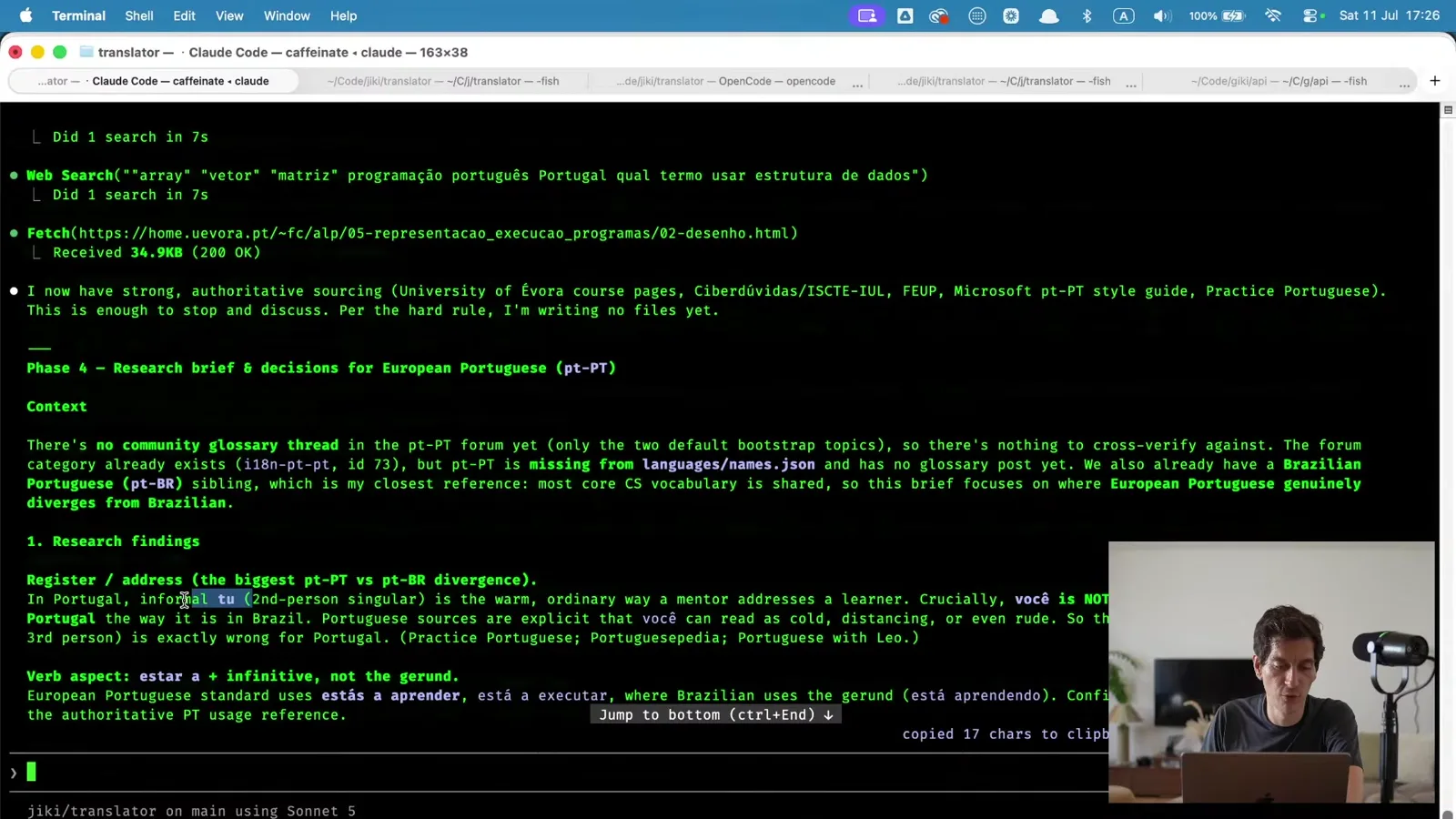
So this is the command that I've built, that it can then go and follow. And we can see it in the background churning away. Here you go, it's reporting back its research findings now. This is the way it should address learners: we should use the informal "tu", which is the warm, ordinary way of addressing learners, and not the other, formal tone. And then it asks me for some decisions. Am I okay with this? Should it use the same conventions as Brazil? It gives me some terms it's chosen. And at this point I can look through and say okay, I'm happy with all these decisions, I'm happy with your defaults. And it will then go away and continue.
Are commands and skills the same thing?
Yeah, they're the same. All of the different LLM companies have different names for all of these things.
Agents and models
I want us to stop for a second and think about what's been going on here, because this is a real key to understanding the difference between when you open up the Claude app or ChatGPT and talk to it, and when you're using agentic coding like this.
When you talk to Claude in a user interface, you are asking a question, and you've effectively got one agent that you're talking to, that maybe goes away and checks something and then comes back and continues writing. It's very much a conversation between you and one person, one agent. When you're working in this agentic coding model, what's happening under the hood is we're spawning lots of agents to do different things. We'll have agents that research, agents that plan, agents that build. And we can build our own agents. Agents that might test things in certain ways, agents that might check things conform to certain standards. And often the agent we're speaking to is the one that is managing all the other agents.
Those agents can use different models. So this is a good time to talk about models. No doubt you've heard this term a lot. You probably have a good idea of what models are, but I'll just quickly explain.
Different companies, like OpenAI or Anthropic, have different models, and models are the underlying mechanism by which an LLM runs. This is something that has been trained on a certain amount of data to operate at a certain speed. The frontier models, as they're called, are the very best models. In Anthropic's case, that's currently something called Fable, or Mythos. Those are slower, they're expensive, but they're very powerful. All the way down the other end is Haiku, which is a much quicker model. It's something like 50 times cheaper to run, much faster, but it doesn't reason as well. And then you have Sonnet and you have Opus. So you have these four models, and all of the different providers have these different models. Some of the really high-end ones are super intelligent. Some are much less intelligent but much faster.
For a basic task, say the task that we just looked at, like why is this flag wrong, there will be no difference in performance between Haiku and Fable. But if you use Fable to do it, you'll spend 50 times more money doing it. So one of the things that we always want to be aware of is which model is right for the task. That keeps things really fast, it keeps things at the right level of quality for what we actually need, and it keeps our cost down, which is also important.
When you're running one agent that then runs multiple other agents, they're constantly making that decision as well. If they're spawning agents to do simple things, they will use low-end models. If they're spawning agents to do very complex things, they'll spawn Fable.
Effort
We also have the concept of effort. Effort is how much effort a model is willing to make. So what does effort mean? The way these models work is that they talk to themselves. They have a long, ongoing conversation. You'll have seen this if you use Claude or ChatGPT, where you can see the "show thinking" options, and you can see the model talking back to itself. What they're doing is reasoning, by outputting what they think might be happening and then building on that.
When we talk about effort in the world of Claude, and other tools as well, we're saying how long should you spend talking to yourself before you come back with an answer. Low effort means don't really talk to yourself, just give us the first thing you think. High effort means talk to yourself lots. And the good thing about high effort is that Claude effectively will say the first thing that comes to its mind (it's a bad analogy, but the first thing it comes up with), but it will then also reason about that again, to see if it's sensible or not. Then it will add a third layer, and then it will reason about that whole thing and see if it's sensible or not. And then it will add a fourth thing. It will keep reasoning about what it's saying until it's got to a point that it's happy with, or convinced by. Whereas on low effort, it will just tell you straight away. And that might be wrong, it might not be wrong. It's had no verification over its thinking.
So we have these two axes. We have the quality of the model: Fable, Opus, Sonnet, Haiku. And we have the amount of effort that model is going to make: low, medium, high, extra high. And you can keep going. Often the providers charge more as you get further along.
In Claude Code we can change model just by typing /model, and then we can choose between Opus, Fable, Sonnet or Haiku. And we can choose effort: low, medium, high, or max, with some sparkly max things, and ultracode, where we get some beautiful animations that people have put loads of effort into.
I tend to stick with Opus on medium as my standard model that I use for most things. Most of the stuff I'm doing, I want something like Opus to be able to think through, and I find medium effort is the right balance. But I'm really aware of that, and when I start tasks I think through which model I want. Is this simple or is this hard? How much effort needs to go into this whole process?
How do we keep track of which model is best for a task?
You'll just learn this over time. An easy rule of thumb is to ask yourself how hard it is for you. Is this really easy? Is it like changing a flag in a forum post? That's really easy. Haiku can do that with low effort. Are you asking it to do something that feels mind-bogglingly complex for you? Reach for a better model or more effort.
Fable is amazing for doing long running tasks. To give you an example of this, I had one session open yesterday where I took all of the videos that we have (I'll talk at some point about how I've created the videos) and I extracted all of the English out of the videos. Any English that's written on the screen, I extracted it out of the videos and set it as an overlay, so that I can then just change that to a different language and re-export the videos with a different language on screen.
I got Fable to do that. I set it off on a task. I got it to spawn a Fable agent for each video, so I had 32 Fables running. Each of them went through every bit of the video finding text. They took screenshots, then updated the images, removing the text from the images. Then they worked out what the font was that the text had been written in, what the font size was, the font weight, letter spacing, line spacing, kerning, all of that sort of stuff for variable fonts. They then wrote that text out on the screen in the right place, and then repeatedly took screenshots and compared until the two screenshots were pixel perfect. I had one Fable that planned it all out, researched it, looked at it, wrote some documentation, and then I had an orchestrating Sonnet that went and just spawned more Fables to do all of those jobs. It took about three hours. It cost about $400. Again, it was in my Max subscription, but it would have cost about $400 otherwise. And it basically put all of the videos into a place where they're ready to go.
In that sort of situation, I knew that was quite a complex task. I had tried doing it with Opus before and Opus couldn't do it. It was too complex for Opus, so I knew it needed Fable.
Are frontier models like flagship smartphones?
Yeah, exactly. They are smarter, they are better, but they're also more expensive and they are generally slower. And you have to remember that today's frontier model is like a year from now's cheap model. That's true already. Haiku is equivalent to last year's frontier model. So Haiku is already good enough to do a lot of coding, even though it's the cheap model at the other end. You only need that expensive model if you are really doing something that was impossible on the previous model, like Opus. You really only want to reach for that frontier model in specific situations.
For someone expert, is it not frustrating to pay for coding instead of doing it yourself?
I'm paying $200 a month. While that's a significant amount of money, it's a low amount of money for the amount of extra productivity it creates. I think I'm getting to the point now where I'm at least half again as productive. My output is one and a half times what it was. I don't know what my salary on the open market would be, because I haven't ever had a job, but I imagine it's saving me a fortune if that's the metric. So $200 is a cheap amount. If I was having to pay $2,000 a month for this, it probably wouldn't be worth it for me.
Is it super frustrating lots of the time? Yes. But what I've realized is that it just moves me up a level of abstraction. Before, there's a lot of coding that I'd have had to do that for me was really boring. It might be really interesting for a junior or a mid, but for me it was super boring. Now I don't have to do that, and I don't have to have a junior or a mid that I'm managing. I can just get that done really easily without having to have other people to manage, which means I'm still free to be productive in other ways. So the net benefit is worth it for me.
But I think for a lot of developers it's a lot less fun, a lot less enjoyable than it was. It is also just the reality of the world. We don't have a choice. Maybe some people have the luxury in jobs of not doing this. If you fast forward 10 years, I don't think many people have that luxury. So if you want to future-proof yourself, or you want to get ahead in the industry, getting good at this is, I think, the secret to that.
Permissions and auto mode
Coming back over to the translation task, this is now finished. We've now got some files that have been committed. If we go back over into the forum, we'll see if there's a new post. Ah, so that's interesting. Posting to the public forum was blocked, because I put this in automatic mode.
The way this works is that it tries to do things, and then another LLM monitors what it's doing and checks whether those things look like things I've explicitly said. As soon as it's posting data to other websites, or doing anything like that, it requires me to explicitly say I'm okay with it. And because I had left it in auto mode, just churning away, it didn't ask me if I was okay with it. So it blocked it. It asks, "do you want me to go ahead and create that forum post?", I say yes, and it will now actually go and do it. This is one of the things that's happened in the last two or three months. We now have almost this overseeing LLM that is allowing more things to happen automatically, but is trying to block risky things or dangerous things from happening.
So now if I refresh, here you go. Now we have the glossary. These are all the terms it's found and read. This is everything it's put together. And we now have a post.
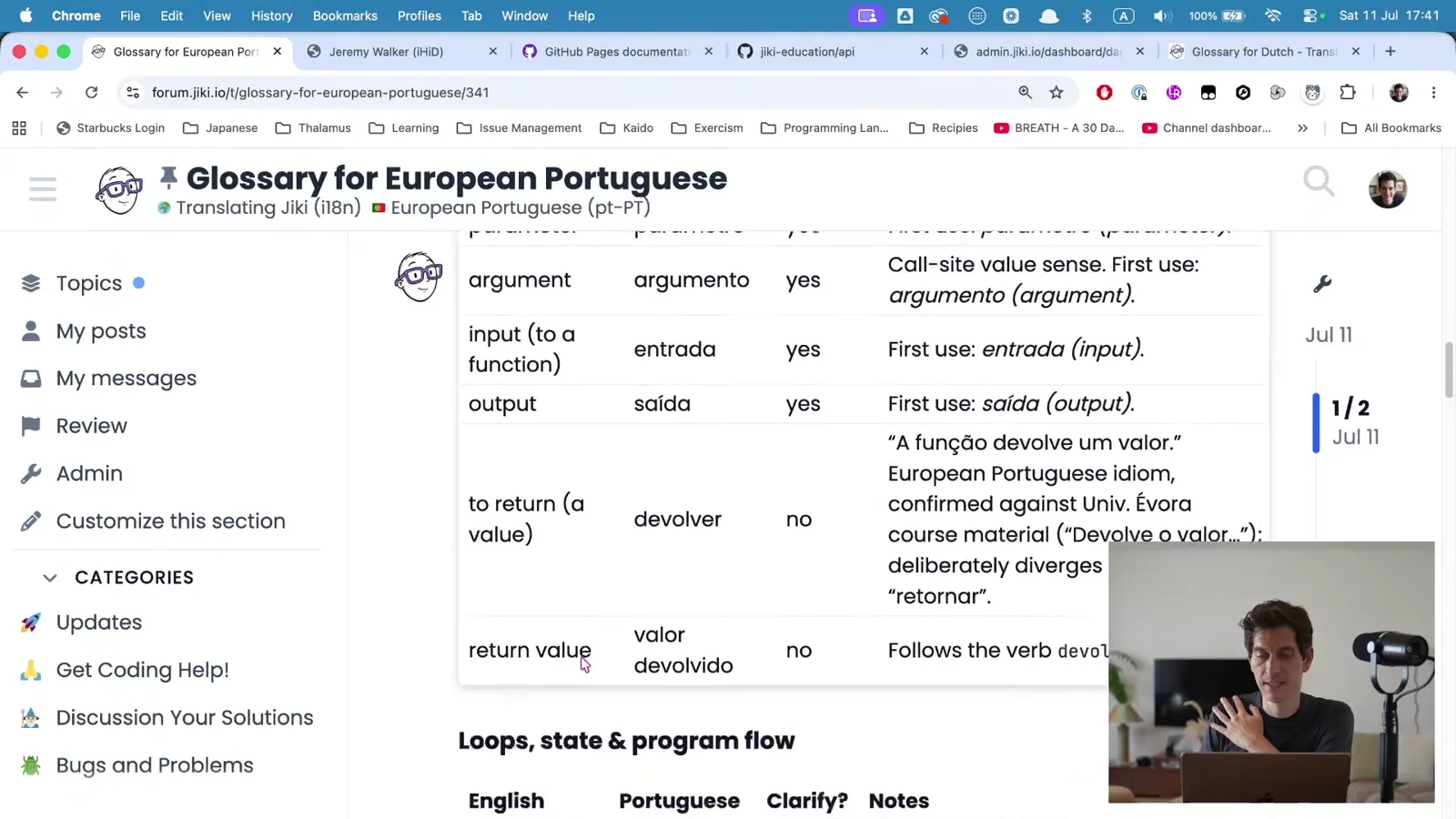 If you speak Portuguese, the European version, you can come in here and you can start telling me everything that is wrong about it, and then we can start improving the glossary and working on it. For those of you that speak other languages, we have glossaries in other versions, Italian, Turkish, and so on. You now know how these have been made. You can go and do this.
Claude Code, Codex and OpenCode
That's my top level overview of how this works. Now what I want to show you is how you can get this set up for yourself.
There are lots of different agents and different tools that you can use. So let's be very clear on some of our language here. Claude Code, which is the window you just saw me working within, is an agentic coding tool, maybe an agentic coding platform. It runs on your computer. Normally it runs in the terminal, which is how I've got it set up. We can also run it in a code editor, which we're going to look at in a minute. And it is the portal between you and the models. I showed you I can switch between Opus, Sonnet, Haiku, and I can switch between effort levels.
All of that is happening on your local computer. You are talking on your local computer. It is sending data off to Anthropic, to one of their models. What they send back is not just a bit of text that appears on the screen. They are sending back a whole load of instructions that Claude Code can interpret to do stuff. They are saying go and run this script on the person's computer. Go and look in this directory on the person's computer. Go and hit this website over here and do stuff. All of those instructions are coming back from Claude.
So we're not having a conversation with Opus or with Sonnet or Haiku. We are putting some text in. That text is getting bundled up with loads of other stuff. It's getting bundled up with code from our repository, code that we've written or that has been put in there. It's being bundled up with the whole history of the conversation, objectives that we're trying to achieve, our preferences as to how we like to work. All of that's getting bundled up, and then all of that is getting sent off to Anthropic. Their models are reading all of that and then bringing instructions and some text back. All of that's getting processed, and then this loop occurs, this agentic loop, where it does something, it goes back to Claude, Claude comes back and says okay, now do this. All of this is happening away from us. And then at the end of it, it tells us: okay, now we're done. We couldn't send the forum post because of this. Do you want to continue? There's this whole massive loop happening behind the scenes.
So we have two decisions. One decision is which models we want to use. Do we want to use Anthropic, OpenAI, or other models in the background? And the second decision is which tool we want to be interacting with. If I use Claude Code, I'm always interacting with one of Anthropic's models. If I use Codex, which is OpenAI's version, I'm always interacting with one of OpenAI's models, one of the GPT models.
What I'm going to recommend you use is something else, which is called OpenCode. OpenCode is an open source version, if you like, of Claude Code, an open source version of Codex. It's the harness, the tool that's sitting on your computer, that is doing that whole loop, that's managing everything. But it can speak to any model. It can be speaking to Anthropic, to Opus or Sonnet. It can be speaking to GPT-5 and those other things. But it can also be speaking to a lot of free models. OpenCode itself is free, and it has a series of free models that you can use as well.
We get to OpenCode just by being in a terminal and typing opencode once we've installed it. And we can choose between lots of models. We can choose Gemini, which is Google's. We can choose Opus, which we just talked about, or Fable. We can choose Grok, if you want to support Elon Musk. The GPTs. DeepSeek, a model that famously came out of China. Qwen, very good for coding. And all of these options at the top, which are free ones. So if you don't have much money, or if you just want to try this out, or if your work isn't paying for a subscription, you can get OpenCode for free and then you can choose one of these free models.
I've got a guide that I'll publish that explains how to install OpenCode, how to get set up for free, and which of these models you can use. I'm recommending DeepSeek V4 Flash (free) for the moment, but I haven't tried these much at all, so you can try them out yourself and see what works for you.
One caveat: these free ones are not frontier models. Although Big Pickle is a secret model, so it might be a frontier model, we don't know. But the others are not frontier models. They're not the top, best models. They are going to be more like Haiku or Sonnet, lower level models. But for where you're at, I think that's a really good thing. Because the steps you want to be taking are small little baby steps, where you don't want a super intelligence doing everything for you. You want someone you can be working with and talking with, where you can be taking little step by little step, asking how things work, and learning about things.
Tokens and context
Let me show you OpenCode in the translator repo. This knows nothing about my repo. But I can say something like "how many languages do we have so far?" and this will go away. This is what OpenCode looks like. We have a speaking bit on the left. We have the bit we type into at the bottom left. When it's running, we have a bit on the right. We can hit Ctrl+P to get various commands and things that you can play with. You can see this is very fast. It thought for a few milliseconds, read some stuff, worked this out, came back with 14 languages. If you highlight something, it copies it to your clipboard, which is nice.
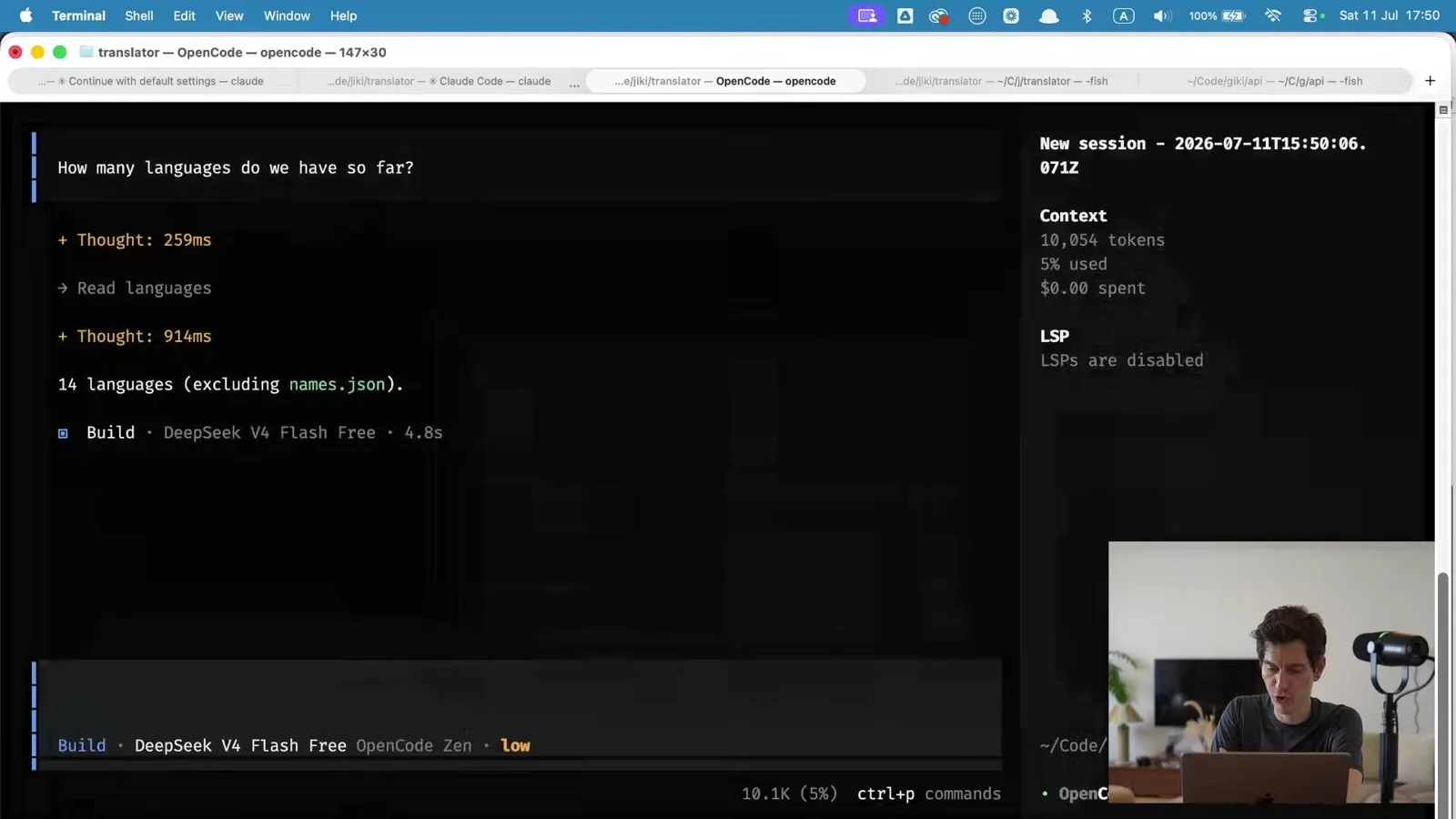
You can see it's free, so we've spent nothing. But I want you to pay a little bit of attention to the numbers on the right. I'm not going to explain how LLMs work in depth, because it's a rabbit hole that's not worth us going down. But the fundamental unit of an LLM is a token. You can think of a token as a syllable. "How" is probably one token. "Language" is probably three tokens: lang-u-age, something like that. "DeepSeek" probably two tokens. "V4" probably two tokens.
Whenever you type something, it takes what you've typed, and it takes whatever it needs to work out the answer, and sends all that off to the model. The model reads it, sends it back, probably asks a clarifying question, and it goes back and forth a little bit. It uses tokens. We asked "how many languages do we have so far?". That's maybe 11 tokens, maybe with the spaces it's 15 tokens. By the time it had finished reading, getting everything it needed, sending it off, doing a couple of hops, it used 10,000 tokens. So this has effectively sent a 3,000 word essay off to a model and then returned a little bit back.
If we ask a bigger question, like "what is the process of adding a new language?", it goes away and reads more files, and you can see the tokens climbing as it reads. That added another 6,000 tokens to answer the question, and it has now used 10% of our context. The context of this model, the maximum amount of tokens that it can have in one conversation, is about 170,000 tokens.
When you're working on this, you need to keep a little bit of an eye on that. As you use more and more tokens, the whole conversation will get slower, because all of that context is passed to the model every single time. If I ask one more thing, all of that information is sent off to the model again. All of the previous conversation, all of the previous answers. Everything gets sent for every step in the conversation.
One of the other disadvantages of using free models is they tend to have a smaller volume of conversation that you can have. Opus is 1 million tokens per conversation. This is going to be closer to 150,000 or 170,000. So you want to be constantly starting new conversations. If you write /new, that will give you a new conversation. That resets your tokens, but your model also then knows nothing about what's just happened. So you want to try and get into the habit of having small little conversations about different things.
Do Aron and Nicole also work this way on Jiki?
Yeah. Aron uses this almost entirely for any front end work he does. Nicole does the same for video editing. All of our videos are written in code. We don't make videos in a video editor. We make them in code, and then she works with Claude to build out all the videos in code from that as well.
Are the free models cloud-based?
Yes, the free models are all cloud-based. They would be very, very slow on your machines.
Would you recommend Mistral?
I don't really know anything about any models outside of Anthropic. I just work with Claude personally, day to day. I've never used it, so I don't know. I personally would just use Claude, but I would probably only use Claude on a subscription where I'm not paying per token.
Building your first web page
That first half was a bit of a deep dive into what LLMs are, what agentic coding is, the modern loop that we as developers are using. That's really what I'm hoping, over the next few months and the year, you're going to get comfortable with. Comfortable enough to make anything under the sun. But I really want to emphasize, before we go on, this idea that the important thing is for you to understand what's going on under the hood.
I'm aware that I've given you a lot of information in that first half. So in the second half we're going to look at making a homepage for yourself. I was thinking today we were going to get on to some other bits, but I think we're going to leave those to the next session. In the next session I think we'll be looking at deploying all of this, and we will be looking at pushing it to GitHub. I've also got an exclusive offer for everyone that's doing Jiki, where you get a free .tech domain, and soon you'll be able to get a free .online domain or .space domain as well. So you can create a website for yourself with that domain. I'll be talking more about that in the next session. But today we are going to continue looking at building your first web page, and thinking a little bit about what's involved in that.
VS Code
We've talked a little bit about agentic coding being in a terminal, and just writing your instructions to Claude or to whichever models, whichever tools, you use. The old school way to do all this was to work inside a coding editor, a text editor. There have been lots of text editors throughout history, but the one that most of us have ended up using today is something called VS Code. If you have never used a text editor before, a coding editor, I recommend installing VS Code. In the guides that I'm publishing alongside this, there's a guide to installing VS Code and using VS Code.
What you saw earlier when you saw me looking through files, that was VS Code. It is just a frame, a sort of canvas, where you can edit text files, and it has a little bit of a shelf down the side that lists all your files.
So what we're going to do is build a homepage. I'm going to make a directory first of all. Come up to File, Open Folder, and we're just going to make a directory. I'm just going to put it on my desktop: "my new homepage". I'm going to encourage you to be sitting in VS Code as your main space. So create yourself a directory. If you're watching along now, you can do this. If you don't have VS Code installed, you can pause, go read the guide on how to install VS Code, and then come back.
We can open that directory up, and we can see it asks if we trust the authors. As we are the authors, we can trust ourselves. And you can see that we've got some space, and this is going to be where files appear on the side. You have a terminal down at the bottom, and we can actually just open OpenCode in that terminal. So we can be using OpenCode at the bottom and then viewing files at the top. Because I want to make my screen big, I'm just going to keep them separate for a moment, and have OpenCode on one side and then all of the files on the other side, just so we can see what's going on.
Let's go into the new directory we've just made and open OpenCode there. Somebody suggested trying a different model, Big Pickle. I haven't used Big Pickle. Let's try it and see what happens. We're not doing anything complex at all here.
What a web page is
I want to talk a little bit here about what a web page is and how a web page works. Over the coming however long, we're going to be doing lots of JavaScript, CSS, complicated stuff. Today we're just doing the most basic things. If you know anything about websites, this is probably going to feel really basic. If you don't know anything, hopefully this is going to be a good primer for what comes next.
Let's talk a little bit about what a standard, simple web page is. For this we can just use my existing personal website. It's pretty straightforward. It's just some text on a page. You can go to any website, and you can right click and go to View Page Source, and you will see something like this, which is a whole load of stuff. This is HTML.
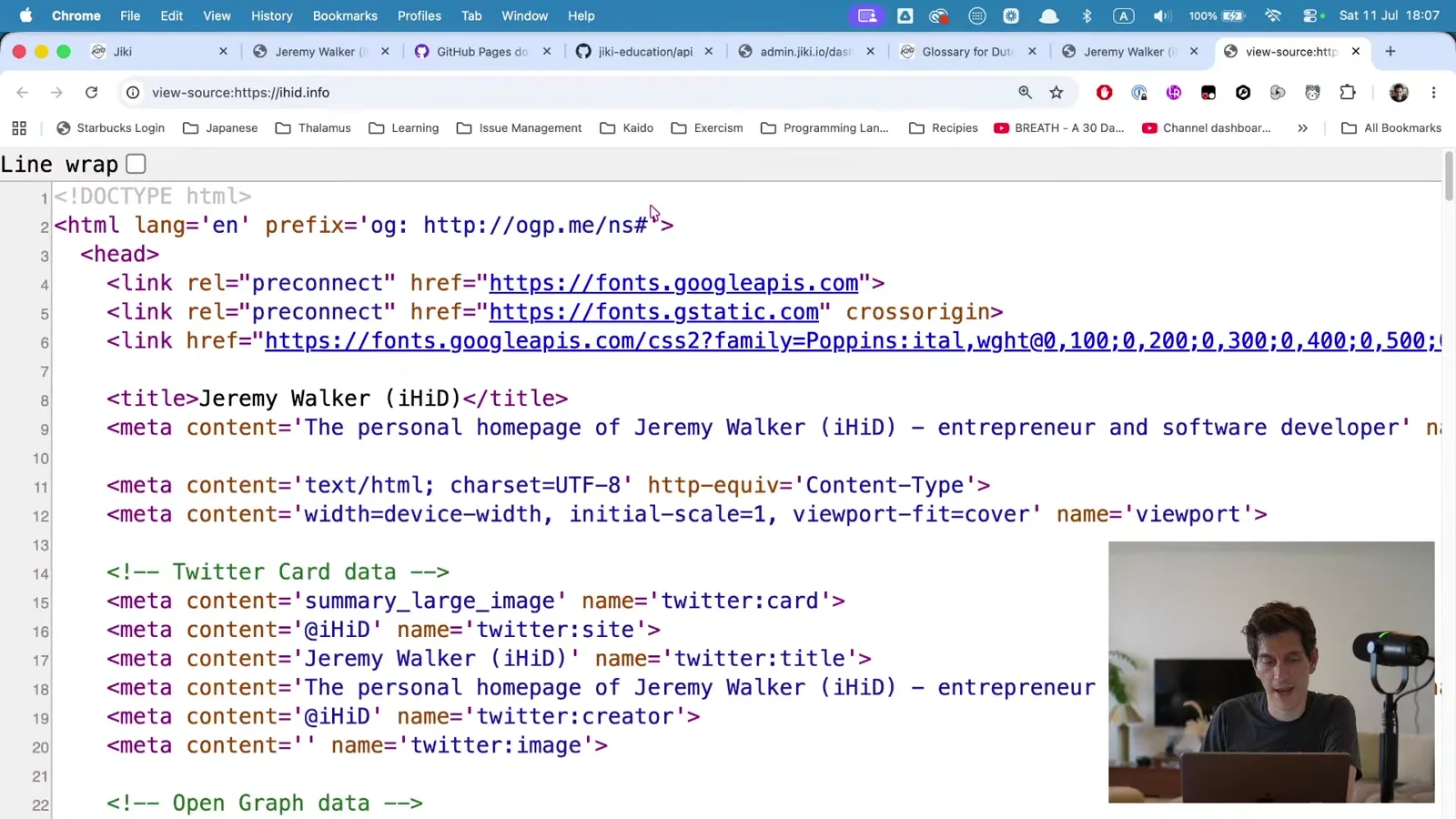
HTML is famous for having this less-than at the start and greater-than at the end of different things. This is what we call a head tag. We then have some CSS. CSS is about styling. We'll talk about that in a minute. And then we have all of the content of the page. This is the header. You can see the header here being purple. It's got an image in it. img stands for image, with a link to an image. It has some text, a biography of me, and then some more text broken up into paragraphs. p stands for paragraph. A bit more information, some headings. This is a level two heading, this is a level one heading. And this is JavaScript down here, which looks slightly familiar if you've done Coding Fundamentals.
When we did the bootcamp last year and we did the web dev fundamentals, we spent a lot of time looking at this HTML in great depth, and CSS in great depth. Making sure that you understood all of the different tags and how they work. Also understanding CSS and how we can use that to style things.
This is an example of how I think things have flipped. I now think what we want to do is just make stuff, and then look at what we've made and understand what it looks like. So rather than what I would have recommended before, and what in fact you'd have had to do before, which was to start writing all this out, what I recommend now is that we just get our LLM to make us a really, really basic structure that we can use.
index.html
The other thing to know is that there's this very longstanding convention that a file called index.html is the first page on a website. If you go to ihid.info/index.html, this is effectively what you see, the front page. The rule is that if you don't put anything after the domain, it looks to see if there's a file called index.html, and if there is, it just shows its contents. This index.html is a very special file. It doesn't really do anything magical. It's just a standard. But a lot of websites traditionally have this as a way of doing something.
So if you've got OpenCode open, you can say:
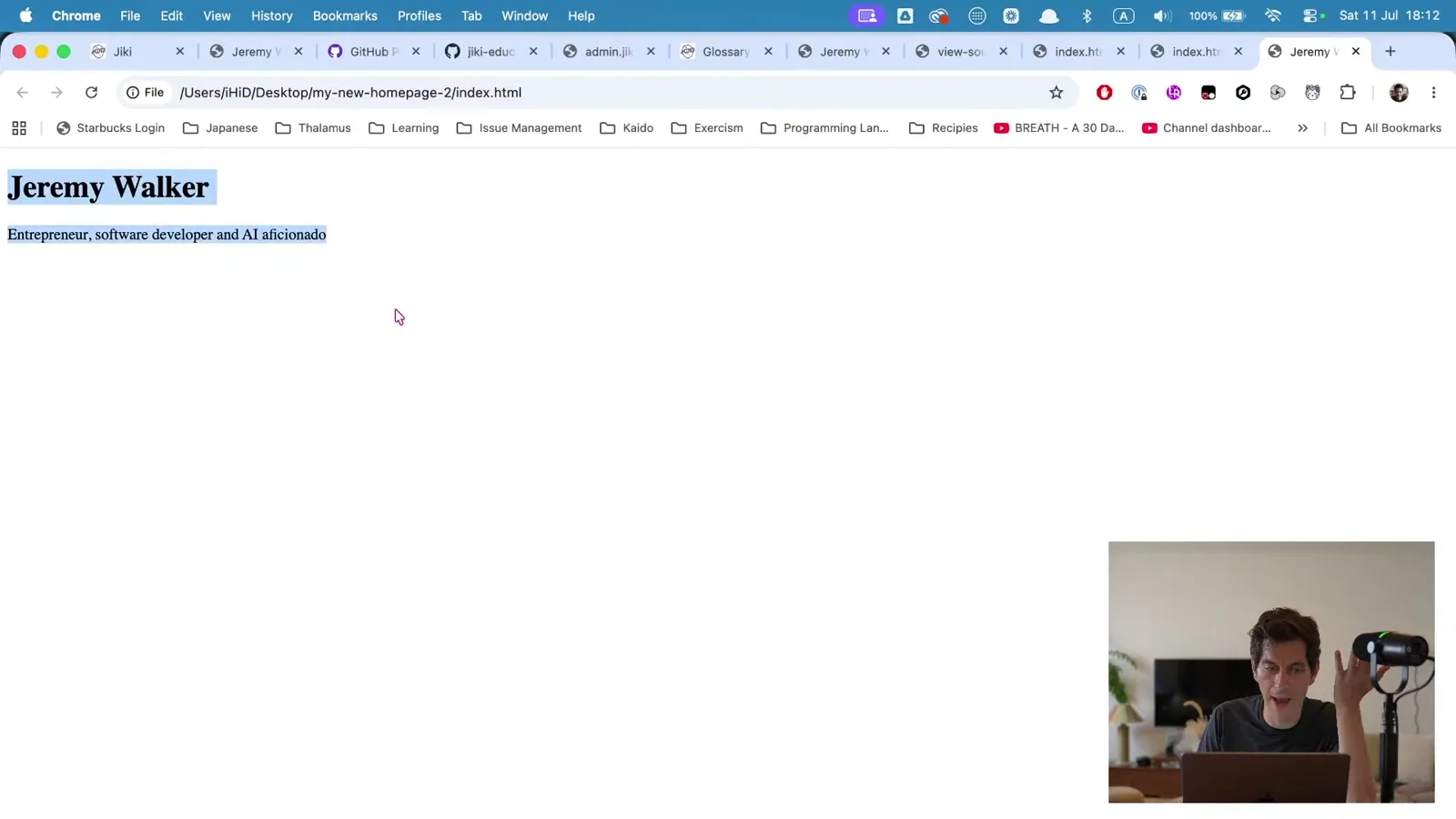
Create an index.html that has the most barebones scaffolding for a page, with a header of my name, Jeremy Walker, and a line of bio of this.
We've got a pivot here. We could, if we wanted to, say "go away and create me a whole website", and it would do that. But two things would happen. One, it wouldn't be a website we want. As we move forward, we're going to think about what those websites are, and I'm going to actually challenge you to go away and think about a website. We'll talk about that in a minute. But also, it would just give you so much stuff, and you wouldn't learn from it. Whereas instead, by taking these small little steps, this is how you're going to learn how things work.
So we send this off, and that's what it's written out. We can now look in VS Code and open this up. This is my workflow when I'm doing this. I have my whole website here, maybe thousands of different files, and I get my agent to work on the files. And then if I need to check anything, see what it's doing, edit stuff, I just open it up over here and have a look at it.
And then the other thing we can do now we've got this file is actually open it in Chrome. If you just right click on the file and say Open With Chrome, you can now see we have a page that we've just made. So congratulations. You have built yourself a homepage. It's not a very exciting or good homepage, but it is a homepage.
Understanding what it made
I want us to take a minute, and this is the mindset I always want you to be in, of taking a minute to look at what's happening here. The way I want to encourage you to do this, now you've made that, is to say:
Explain to me what each bit does.
You can use this loop not just for getting it to do stuff, but also for understanding, for building knowledge on how things work. It shouldn't be that complex a question for it, as a) it just wrote it, and b) it's very simple. And it explains. Here we go.
The first line, the doctype tag, tells the browser that this is an HTML5 document. So what's actually happening here? What is this HTML? Well, this browser is Chrome (other browsers are available). It knows how to read an HTML file and how to put it on screen in a way that you can see. HTML is a specification. It stands for hypertext markup language. It looks like this, with a load of tags and bits of information, and Chrome, or any other browser, can read these tags and put them on a screen.
Forget the bit at the top for the moment. Just look down at the body. It's putting a heading and it's putting paragraph text. This h1 stands for level one heading. And you can see, because this is a level one heading, Chrome knows to make it a bit bigger and a bit bolder. Whereas this p is a paragraph. Chrome knows to make it a bit smaller.
We could, if we wanted, put some other tags in here. This is an unordered list, ul, and inside we'd have list items, li. One thing that has happened since I've started using Claude is that I can't type very well anymore. And so we can put together different tags, and this will give us some bullet points.
So this is the anatomy, the bones, of a web page. Every single web page is the same. If we go to jiki.io and view the source of the page, you can see it's exactly the same. It's lots and lots of these tags. We can see this is the same. We just used an unordered list, a list item, a link with some text with an icon next to it. This is what HTML is. Whenever you're making any website, from now until the end of history, you're always outputting HTML to a web browser.
Let's finish reading through what it's so kindly put together. So what do we have next? We've got the doctype, which says this is an HTML document. Then we say okay, this is the start of our HTML document, and the language this document is in is English.
We then have two parts. We have the head, and we have the body.
The first thing in the head is what characters we're using, and we're using this set of characters called UTF-8. Each of these is a character. We're saying we can use any character that's like a Latin, Roman character, like these, or we could use emojis in here as well. If we grab an emoji, we can put it in this document directly, and then refresh, and we've got an emoji on the page. That's what this means. It's saying this is all of the characters that you commonly use. This is our standard character set.
We also have a viewport. We don't need to worry about that for now.
And we have a title. The title is Jeremy Walker. This title is the title that appears at the top of the tab. One thing you'll be thinking about lots as you code is what titles you want to appear there, so when people have different tabs open, they get something they want up there. We can also change things like the favicon. You can see we've not done that yet, so we don't have an icon there.
This head section is everything that doesn't appear on screen. Everything that search engines might look at, and other things like that, lives in the head. And then the body is everything in the square space below. And this is quite literally a heading, a paragraph, and a list.
So this is what the explanation tells us. The html tag is the root element. The head is metadata. Metadata just means data that is about the page, not stuff that you see. The charset is the character encoding that makes your emojis and some other language characters display. We don't want to worry about the viewport. And then the body is the other stuff we've looked at.
For those of you that have been writing HTML for years, I'm sorry that this is so basic for you, but you learned this from scratch once as well.
Adding some real content
You can now use your agent to add some HTML. Let's take some more copy. If you've got a LinkedIn profile, you might want to go and grab some copy from there. In fact, let's just do that. Let's go to my LinkedIn and grab some information from there. And we can give this to our LLM. We can say:
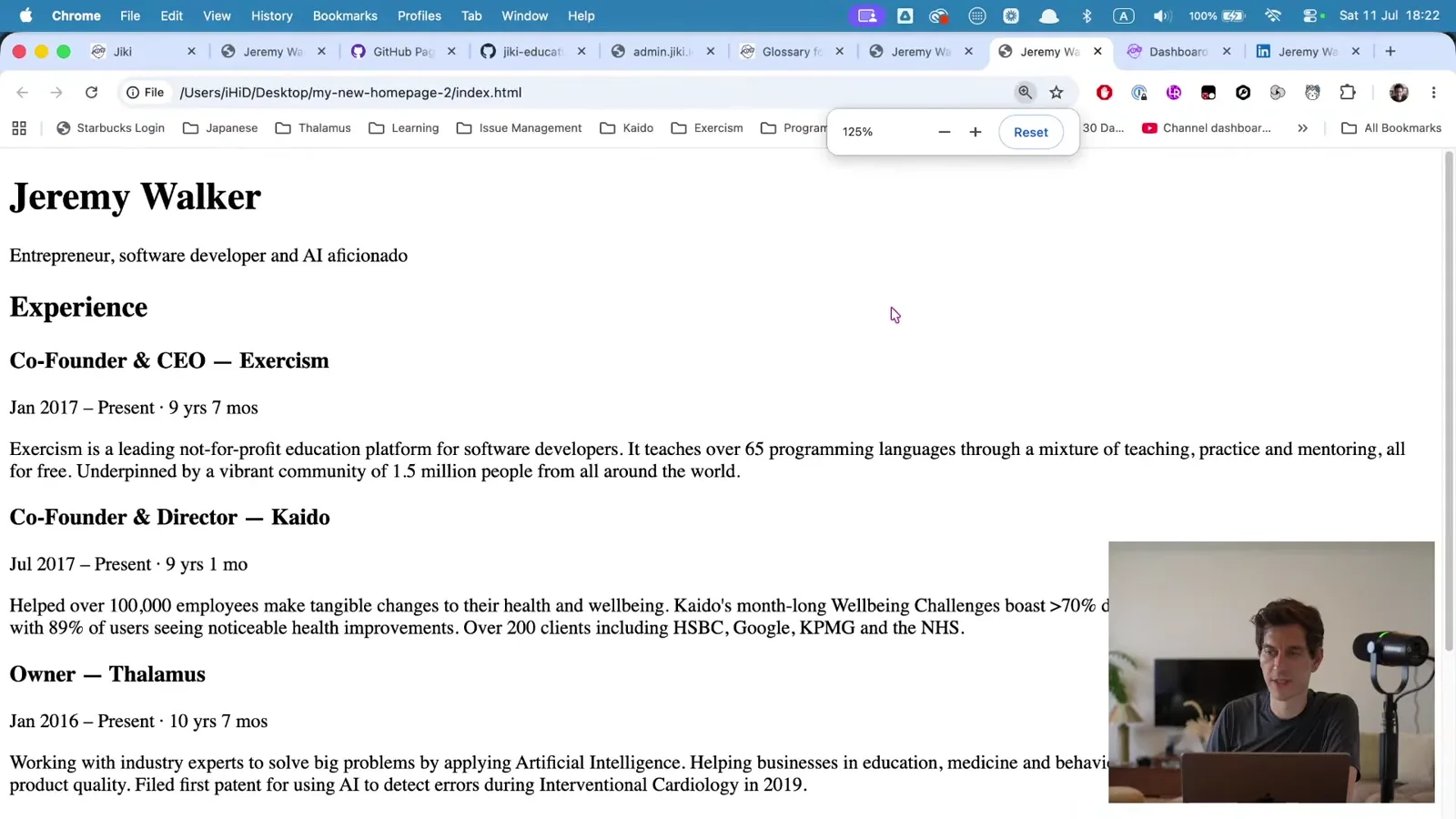
Here is some information from my LinkedIn. Structure it in a sensible manner below the header in the page.
We give it this copy, and it's going to go away and structure it for us. Again, going back two years, you'd be having to manually write tags, write all this stuff. Instead, we now have the ability to just give it some text and get it to put some sensible structure around it. Now, we're not asking it here to style it, or to make it look a particular way. We're just asking it to put some structure around it, some HTML around it. Let's see how good Big Pickle is at doing this.
Once I'm beyond this first session, by the way, I'm going to be using Claude for the majority of the stuff I do, just because I know it really well and also it's quick. But if you're following along yourself, I recommend doing this. If you've got a LinkedIn, if you've got a resume, you can just copy that stuff, put it into OpenCode, and ask it to build this thing.
It's thought for a little bit. It's now preparing the edit. And it's added the code in. Here you go. We now have a nice "Experience" level two heading, and we have the other information. If we go over to Chrome and refresh, we can now see we have a barebones bit of nicely structured code.
Your homework
The next thing for us to think about is what we want our personal homepage to look like. This is a question I want you to spend some time on. I'm going to encourage you a lot over this course to get a pen and a notepad, sit in a quiet place, as far away from a screen as possible, and just think.
We're going to build a homepage for ourselves. That homepage needs to have a few things. It needs to have an overview of ourselves and our interests. It needs to have a page which is our resume, our CV. It's going to have a page about our portfolio, all the projects we're making, and then it's going to link off to other pages about those projects. So we're going to build a big, multi-page website over time. We'll do most of that in the second session. Today we're just doing this one overview page. But I want you to think through, with pen and paper, and draw out what you would like the different pages to be like.
And think through a bit of a style. Look at some other people's pages. Find other people in the Exercism community. If I look at Erik Schierboom, who used to work for us, he has a really straightforward core landing page, and then an about page, which is quite neat, with a nice little thing that comes at the bottom. He has some information about software, places where he's done speaking, and then some links off. You might be quite inspired by that. Or if we look at SleeplessByte. You might remember DJ if you were on the bootcamps, or from the mentors. This is DJ's page. So go and find people that you're interested in and be inspired by what they've done. Think about visually what type of style you like. And we'll talk a bit about making images and how you can use tech to make images.
Explore different people's ideas. I'm always quite a fan of a very minimalistic sort of feel. And for this project, I'm going to go away over the next few days and think about what I want my new landing page to look like as well, because I'm going to make this homepage for myself. I'm going to think about how it breaks up. I want a section for my photography. I want a section where I can have my podcasts and videos and things that I've made. I want a bit of a bio, and I want a CV, a resume. So I'm going to go away and think about those things.
Your homework for this week is to go and think about that, design it, and then start structuring those pages. You can create multiple pages. We can create another page, let's call it my resume, and we can copy and paste our content into it, delete the bits we don't need, and change the title to "Jeremy's Resume". We've now got our index page, but we can also now go to resume.html and have that as another page.
So, this week:
- Think about the different pages you're going to want, and the different content you're going to put in those pages.
- Install VS Code.
- Install OpenCode and set a model up.
- Working with OpenCode, put together a few of these different pages.
Don't worry about styling it yet. I don't want you to get involved in that really. You can play if you want to, I'll always encourage people to be curious, but I'd like to teach you what I think the best ways of doing that are in the modern world. Definitely don't start using JavaScript frameworks or anything else. Just keep to barebones HTML, and then we're going to layer it up in each session until it gets more and more powerful and more and more complex. This way you're going to understand how everything happens.
If you're interested, go and research a bit more about HTML. Work out what the different tags are and what they mean. Researching nowadays can be as simple as asking:
Tell me the most common 20 tags.
And then:
Tell me what each of them is for.
That's how I research stuff.
We'll do the next session in a few days. By that point, I'm hoping that you will be coming with OpenCode installed, VS Code installed, and a series of pages. Next time we're going to start linking those pages together, add some navigation, add some styling, and we're also going to get this deployed on GitHub, and maybe even get you a custom domain, so you can have your own personal website on a domain for free. You might also want to sign up to GitHub this week as well, at github.com. I'll be publishing guides for VS Code, OpenCode, and GitHub, and you can follow those guides through.
That's the end of this first session. Thank you for watching. I hope it's been interesting. I hope you've enjoyed it. If you've got any questions about anything that's been covered, please jump on the forum. I will be there, and I'm looking forward to answering questions and exploring questions. I don't necessarily have all the answers. I love learning as well. So ask whatever you're interested in. And I look forward to seeing you in the next session.